If you’ve heard the term Google Block Breaker and wondered what it is, don’t worry — you’re not alone. Many people search for it because they think it’s a secret Google game or a hidden trick inside Google Search.
In simple words, Google Block Breaker is a fun brick-breaking mini-game, similar to the old classic Atari Breakout.
You control a small paddle, bounce a ball, and try to break all the blocks on the screen.
It’s just a simple time-pass game that gives a little nostalgic feeling.
What Is Google Block Breaker?
Google Block Breaker is a hidden mini-game that Google created as a fun Easter egg.
It works just like the classic “brick breaker” games we all played on old phones and computers.
You have:
- A paddle
- A bouncing ball
- A row of colorful blocks
- A goal to break every block without losing the ball
That’s literally it — nothing complicated.
Google made it for fun, not for ranking or SEO.
It’s just a small entertainment feature people love to discover.
How the Block Breaker Game Works?
The rules are simple.
You control the paddle at the bottom of the screen.
The ball keeps bouncing.
Every time it touches a block, that block breaks.
If the ball falls below your paddle → you lose a life.
The challenge becomes harder as:
- The ball speeds up
- Blocks reduce
- Angles become tricky
It’s simple, quick, and surprisingly addictive.
How to Play Google Block Breaker (Step-by-Step)
Here is the easiest way to try the game:
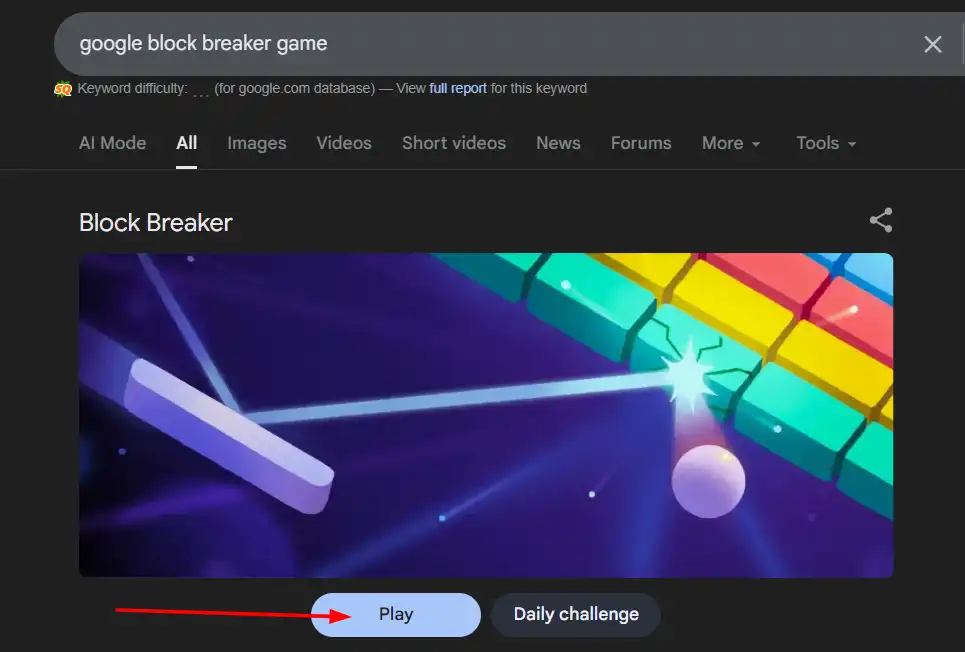
- Open Google.
- Search for: “Google Block Breaker game.”
- Click on a playable version from the results.
- Use your mouse, keyboard, or touch controls to move the paddle.
- Keep the ball bouncing and break all blocks.
Some versions appear in Google Doodles or Google Labs experiments, while others are recreated on third-party sites. You don’t need to install anything.
Why Do People Search for Google Block Breaker?
People search for this game mostly because of:
- Curiosity
- Google Easter egg hype
- Nostalgia
- Wanting a quick time-pass game
- Trying to find a modern version of Atari Breakout
It’s not a Google tool or SEO feature — it’s just entertainment.
Google Block Breaker vs. Atari Breakout
Many people confuse both. Here is the simple difference:
Similarities
- Both are brick-breaking games
- Same paddle + ball concept
- Same goal: clear all blocks
Differences
- Atari Breakout is the original classic game
- Google Block Breaker is a simple Easter egg version
- Graphics and speed differ
- Google’s version is not always officially available
Both give the same fun retro feeling.
Tips to Score Higher
If you want to improve your game, here are simple tips:
- Hit the ball from paddle edges to change direction
- Aim for the corners first — they open more space
- Keep the paddle centered for better control
- Watch the angle of each shot
- Stay relaxed — the faster you panic, the quicker you lose
Small tricks make a big difference.
Is Google Block Breaker Safe?
Yes — as long as you’re playing it on:
- Google’s official easter eggs
- Google Doodle pages
- Trusted websites that host the game
Avoid downloading EXE/APK files claiming to be Block Breaker. (The game does not require installation.)
Can You Play It on Mobile?
Yes, the game works perfectly on mobile. You can play it in any browser like Chrome or Safari.
Touch-based controls make it even easier.
Best Alternatives to Google Block Breaker
If you enjoy Google Block Breaker and want similar games, here are some great alternatives. Each one gives you the same fun, brick-breaking experience but with its own unique twist.
1. Atari Breakout – The Original Classic
Atari Breakout is the game that started the entire brick-breaking trend. It has simple controls, retro graphics, and addictive gameplay. It’s perfect if you want to experience the true old-school version of the game.
2. Brick Breaker Classic – Modern and Smooth
Brick Breaker Classic is a fresh take on the traditional style. It offers smooth controls, clean graphics, and multiple levels. It’s great for casual players who want something simple but polished.
3. Arkanoid – Advanced and Fast-Paced
Arkanoid is a more powerful and advanced version of brick-breaking games. It adds power-ups, special bricks, new challenges, and faster action. If you want something more dynamic than Block Breaker, this one is ideal.
4. DX Ball – Colorful Retro Experience
DX Ball brings a bright, colorful, and nostalgic style inspired by 90s PC games. It has fun sound effects, unique backgrounds, and a variety of levels. It’s perfect for players who love classic PC gaming vibes.
Final Words – Google Block Breaker
Google Block Breaker is a simple, fun, and nostalgic mini-game that works like the classic brick-breaking games we used to love.
You only need your browser, and you can play it anytime without installing anything.
If you’re looking for a quick break, this game is perfect.
FAQs About Google Block Breaker
1. Is Google Block Breaker still available?
Some versions appear online and in Google Easter eggs. You can find playable versions by searching for it on Google.
2. Is this an official Google game?
Yes, it was part of Google’s fun Easter eggs, but different versions appear at different times.
3. Is it the same as Atari Breakout?
No, but the gameplay is very similar. Atari Breakout is the original.
4. Can I play it on my phone?
Yes, it works in your mobile browser with touch controls.
5. Do I need to download anything?
No, it’s fully browser-based. Avoid any download claiming to be the game.
Read More : How Rub Ranking Tracks Google Positions Instantly? Here’s How